
Manage air and ocean tabs in the Shipsgo Embed Map
The Embed map includes Air and Ocean tabs. You can control how air and ocean tabs appear in your map.
You can use the tabs query parameter to show/hide them, or change their order as needed.
- Show only Air shipments: https://embed.shipsgo.com/?token={token}&tabs=air
- Show only Ocean shipments: https://embed.shipsgo.com/?token={token}&tabs=ocean
- Show Both tabs:https://embed.shipsgo.com/?token={token}&tabs=air,ocean
You can also change the order of the tabs by adjusting the sequence in the tabs parameter.
For example;
https://embed.shipsgo.com/?token={token}&tabs=air,ocean
https://embed.shipsgo.com/?token={token}&tabs=ocean,air
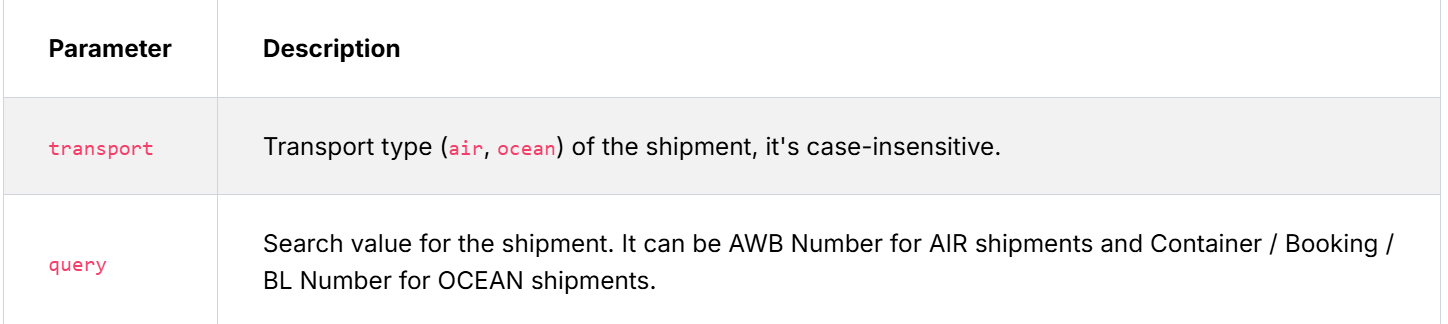
If you want to show shipment details (location, movements etc.) you must use both transport & query query parameters.
https://embed.shipsgo.com/?token={token}&transport=air&query=333-88888888
https://embed.shipsgo.com/?token={token}&transport=ocean&query=MEDU1234566
If you want to shipment details only user interface (without Search & Search History), you can set tabs parameter as none .
https://embed.shipsgo.com/?token={token}&tabs=none&transport=air&query=333-88888888
https://embed.shipsgo.com/?token={token}&tabs=none&transport=ocean&query=MEDU1234566
You can also review these guidelines in more detail directly within your dashboard. Simply navigate to Integrations → Embed (iframe) to access all configuration options.